
Data plans
Whether enabling passengers to see the live location of a bus or train on their phone or tap to pay their fare with contactless payment, transit is leveraging cellular data and connectivity to modernize and improve the rider experience.
California is making it easier for public transit providers to get the data plans they need through Master Service Agreements (MSAs) established by DGS↗. These data-only plans are available to agencies with pre-negotiated rates listed. Your transit agency may be eligible to upgrade your data plan and save on your monthly connectivity costs.
Figure out what you need to get a data plan that meets your needs:
- Choose a data-only provider and plan that fits your agency’s needs
- Review purchase options: You can access data plans in the commercial marketplace or at discounted rates on CALNET↗ or on NASPO↗
- Engage the vendor you’d like to purchase from
- Sign the agreement
- Implement and launch, be sure to coordinate with your hardware providers to align on who will install SIMs
Whether enabling passengers to see the live location of a bus or train on their phone or tap to pay their fare with contactless payment, transit is leveraging cellular data and connectivity to modernize and improve the rider experience.
Guide to purchase or change data plans
Choose a data plan
Coverage
Check your area’s coverage, as signal strength can vary. The map below shows FCC data on coverage by providers, including AT&T, T-Mobile, Verizon, and FirstNet.
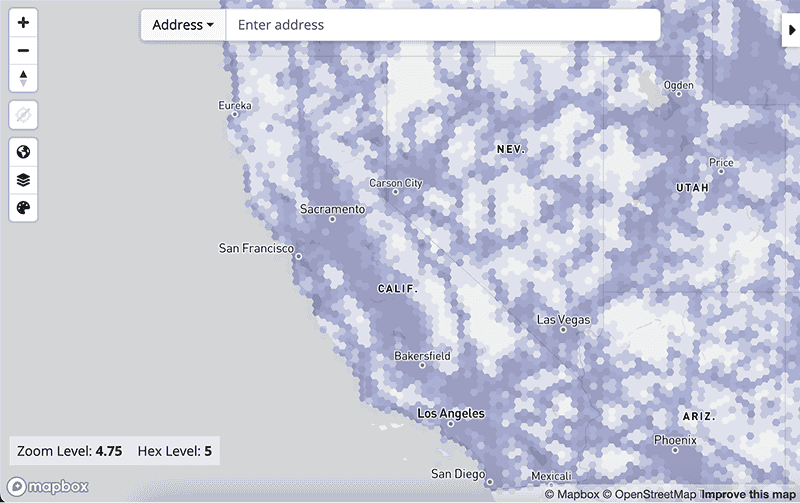
Visit FCC↗ or FirstNet↗ to learn more.
Hardware
Hardware can greatly influence what carrier network you can use. From routers to CAD/AVL systems, camera feeds to passenger Wi-Fi, digital fare validators to digital signage, and more, ask hardware vendors about their network compatibility.
If the hardware you plan to or have purchased is not certified or compatible to use a SIM on your desired network, you can use a router to connect devices via Wi-Fi. There is a higher upfront cost to purchase a router, but it can greatly reduce certification frustration down the road.
Some agencies opt to use multi-SIM to have a fallback across multiple carriers; check that your hardware can support multicarriers. Data prices for primary and secondary coverage are negotiable.
Data estimation
How much data you use depends on how many devices are on each vehicle. Typical usage for GTFS software and one fare payment validator is 2 GB/month.
Funding
You may use funding from various sources to complete this purchase, including the FTA↗, Caltrans↗, and other sources of local and state public funding. You are encouraged to confirm that your funds are eligible to be used for this purchase prior to finalizing the contract.
Review purchase options
Both CALNET and NASPO Agreement and Participating Addendum are standardized and allow you to purchase select goods directly without additional competitive bidding, including but not limited to purchasing more SIMs from a current vendor, switching to another plan, or switching to another vendor.
Data plans MSAs
Cost per month per vehicle, prices are negotiable
| MSAs | CALNET + NASPO | NASPO | ||
|---|---|---|---|---|
| Vendors | AT&T | T-Mobile | Verizon | FirstNet |
| 1 GB | $20 | $8 | $15 | $7.50 |
| 2 GB | $23 | $10 | $20 | – |
| 3 GB | – | – | – | $20 |
| 5 GB | $28 | $21.21 | $25 | – |
| 25 GB | – | – | – | $34 |
| Unlimited | $50 | – | $34.99 | – |
Click on each MSA for terms and conditions.
Reach out to your vendor
Reach out to the vendor you’d like to work with. Share your agency goals, hardware, and desired data plan.
CALNET
AT&T: Aaron Rollins
ar5941@att.com, (916) 837-9795
T-Mobile: Lindsey Shaw
Lindsey.Shaw34@t-mobile.com, (916)
674-0526
Verizon: Melissa Togo
melissa.togo@verizonwireless.com,
(949) 233-1282
Complete the NESPA
Self-certify that your organization qualifies for CALNET eligibility. All non-state government entities must complete a Non-State Entity Service Policy and Agreement (NESPA)↗. Submit completed NESPA forms to calnethelp@state.ca.gov and cc hello@calitp.org.
Need help with the NESPA or unsure if you need one? Reach out at calnethelp@state.ca.gov or call (916) 657-9150.
FirstNet
FirstNet: Brett Perez
Brett.Perez@att.com, (512) 656-2331
FirstNet’s account managers can help you determine how many SIMs you need to purchase. This process from interest to launch typically takes 14 weeks.
If your device is not eligible for FirstNet, you may still be able to get the same rates on the commercial AT&T network. Please contact the FirstNet representatives above to learn more.
Sign agreement
CALNET
Complete Authorization to Order
After you’ve selected your vendor and signed the NESPA, you’re ready to order. To use a CALNET contract, you must have an Authorization to Order (ATO) form on file with the CALNET Program. Each contractor has a unique ATO:
Once the ATO is complete, email it to your vendor.
Submit purchase order
Submit a purchase order directly to your vendor, in accordance with their own procurement rules. You may use the CALNET ordering Form↗ (instructions↗)
FirstNet
Send your request to order via email, including the following information:
- Contacts information (name, phone, email)
- Shipping address
- Anticipated device use case
- Device information (device type, model, and SIM size)
- Quantity of SIMs desired
- Data plan size desired
- Go live target date, if applicable
FirstNet will then provide you with a SIM purchasing and use contract. This contract serves as an addendum to the National Association of State Procurement Officials (NASPO) Agreement #MA149.
Review, sign, and send the contract to your FirstNet account manager.
Implement and launch
Once you’ve completed your order form, your new carrier will set up a device management portal. Depending on your carrier, you may be able to order your SIMs directly from this portal. Be sure to coordinate installation with your hardware provider, especially for PADs, as they may want to install SIMs in the devices.
If switching carriers, be sure to align your previous contract end and new provider start dates so you do not lose coverage.
Additional info
Commonly asked questions
What is FirstNet? Why am I on commercial versus Band 14?
FirstNet is a broadband network provided by AT&T exclusively for first responders, which transit providers are eligible for. The eligibility for the full extent depends in part on the hardware you use. If your hardware is not eligible for the full FirstNet experience (Band 14), you may still be eligible for priority on the commercial AT&T network through your FirstNet service. Contact your account manager for more information.
Why can’t I use a Verizon/T-Mobile/AT&T SIM for my XYZ hardware?
Not all hardware is certified to operate on every network. Certification process is a multi-year process that hardware manufacturers apply for.
If you want to use a network which is incompatible with your hardware, one solution is to connect your device through a certified router via Wi-Fi network. Talk to your hardware vendors to best understand your choices.
How do I change carriers?
You will need to sync the start of the new contract with the expiration of the old one to reduce the risk of service lapse.
If your contract is month-to-month, you can simply switch once your new contract is in place. This process tends to be easier and more seamless. If your contract is on a fixed time period, you can switch when the old one expires.
Still have questions? Email us at hello@calitp.org or calnethelp@state.ca.gov.
Special cases
Does FirstNet offer passenger Wi-Fi?
Chat with your FirstNet account manager to understand what potential solutions could be.